DocumentationTools
Image generation in chat
Images are created in chat via tool-call: the chat model writes the image prompt and calls modern image generation models. We keep the stack current and switch as stronger models become available. Included in the subscription, no separate image billing.
4 min readUpdated
What image generation is
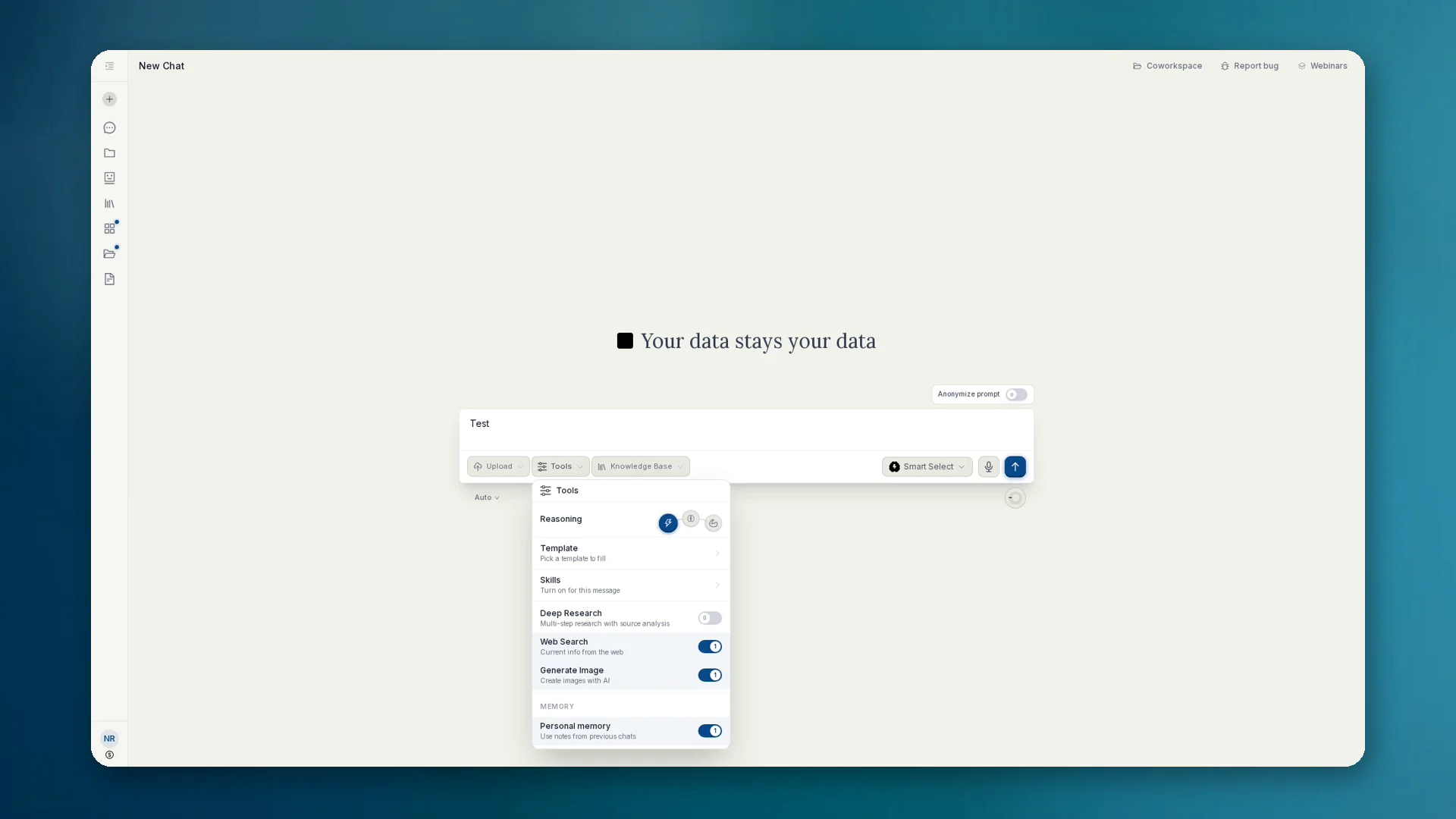
Image generation is not a separate Apps area, it is a tool in chat. You describe what you need. The selected chat model detects the image request, writes an image prompt and calls the image model as an external tool.
anymize uses modern image generation models and continually updates the integration as stronger models become available. You do not need an extra subscription or your own model switch.
How to use it
- 01In chat open Tools and enable Generate Image.
- 02Describe the image you need and send. The chat model starts the tool-call to the image model.
- 03Review the result. Iterate with follow-ups (style, crop, text in the image).
- 04Download as PNG or JPG. Optionally save as an artifact or into a knowledge base.
Privacy and billing
- Prompts are anonymized when needed before they reach external image models.
- Image generation is part of the anymize subscription. No separate pay-per-image billing per product marketing.
- For sensitive subjects: keep anonymization on and check what reaches the endpoint.
When it pays off
- Mockups, infographics, concept art for pitch or client presentation
- Illustrations that used to cost stock or agency time
- Quick variants in the same chat instead of switching tools