DocumentationAnonymization
How anonymization works
anymize replaces sensitive details with placeholders before any AI model sees them, and puts your original data back into the answer.
5 min readUpdated
What anonymization means here
Redaction deletes information. That protects, but it also makes the document useless for an AI: nothing can be inferred from “??? lives in ???”. anymize takes a different path and replaces every recognized detail with a placeholder that reveals the type, not the content.
So the model still reads a complete contract, a complete claims notice, a complete application. It just does not know who Max Müller is. And because every placeholder is unique, anymize finds the way back after the answer.
The decisive difference from redaction: anonymization is reversible. You work with your real cases, the model works with placeholders.
In four steps
From your input to the finished answer everything runs in one pass. You do not prepare anything and you do not clean anything up afterwards.
- 01Detection: A specialized model reads your text or document and marks personal and business-sensitive details. Over 40 categories, multilingual.
- 02Placeholders: Every marked spot gets a unique, semantically typed placeholder, for example [[NACHNAME-a7f39cd]]. The mapping between placeholder and original stays with anymize.
- 03Processing: Only the anonymized version goes to the model you selected. No real name leaves the platform.
- 04Reverse translation: The answer comes back with the same placeholders. anymize puts your original data back in before you read it.
In chat you control this with the “Anonymize” switch right on the input field. It appears as soon as there is text in the field. When you upload a file you decide in the same moment whether it should be anonymized.
What is masked
It is not just names. The table below shows an excerpt of the categories and what the matching placeholder looks like.
| Category | Example | Placeholder |
|---|---|---|
| Names | Max Müller, Dr. Schmidt | [[NACHNAME-a7f39cd]] |
| Addresses | Musterstraße 123, 80331 München | [[ADRESSE-b67d240]] |
| Organizations | Müller GmbH, Weber und Partner | [[FIRMA-8a91c45]] |
| Email and phone | max@example.com, +49 176 12345678 | [[EMAIL-9e72b15]] |
| Bank details | DE89 3704 0044 0532 0130 00 | [[IBAN-d4a7e1b]] |
| ID and tax numbers | L01X00T47, 36 912 345 678 | [[AUSWEIS-a7b4e1f]] |
| File numbers and contract IDs | 123 C 456/24, VP-2019-445566 | [[AZ-d0e7b4c]] |
The placeholders shown are examples. Depending on language and document type they look slightly different, but the typing is always kept. Further categories are added continuously, for example industry-specific identifiers such as insurance numbers.
Review before sending
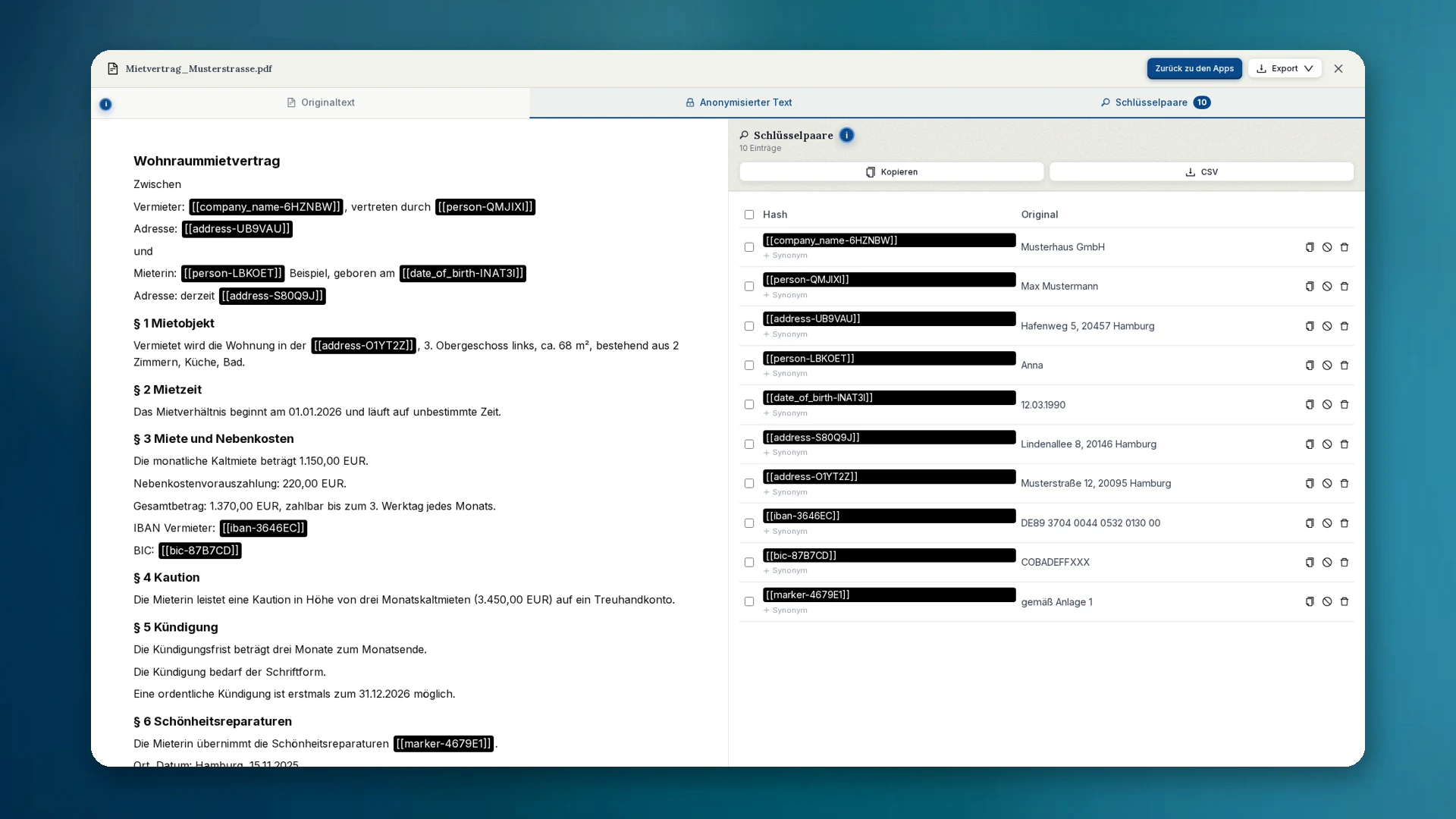
For an anonymized document anymize shows you the result before you continue. The black boxes in the text are the protected spots.
- A click on a box shows you what sits underneath.
- Something missed? Select the spot in the text and add it afterwards.
- Too much masked? Click the box and release the detail again.
- Under “Key pairs” you see the full mapping from placeholder to original.
For sensitive matters this look is always worth it. Detection is good; responsibility for the result still sits with you.
Where the mapping lives
For reverse translation to work, somewhere must record which placeholder belongs to which original. That mapping lives exclusively in Germany and is isolated per workspace. No other customer can query it, and no AI provider gets to see it.
How long it is kept is your decision: 24 hours, 7 days, 30 days or unlimited. The default is 7 days. When the period expires the way back is closed; the anonymized version stays readable.
If you delete a chat, the matching key pairs disappear as well. If you want to keep a result with original data, download it first.