DocumentationOutils
Recherche intensive
Outil de recherche multi-étapes dans le chat, à côté de la recherche web. Les admins peuvent le désactiver.
4 min de lectureMis à jour le
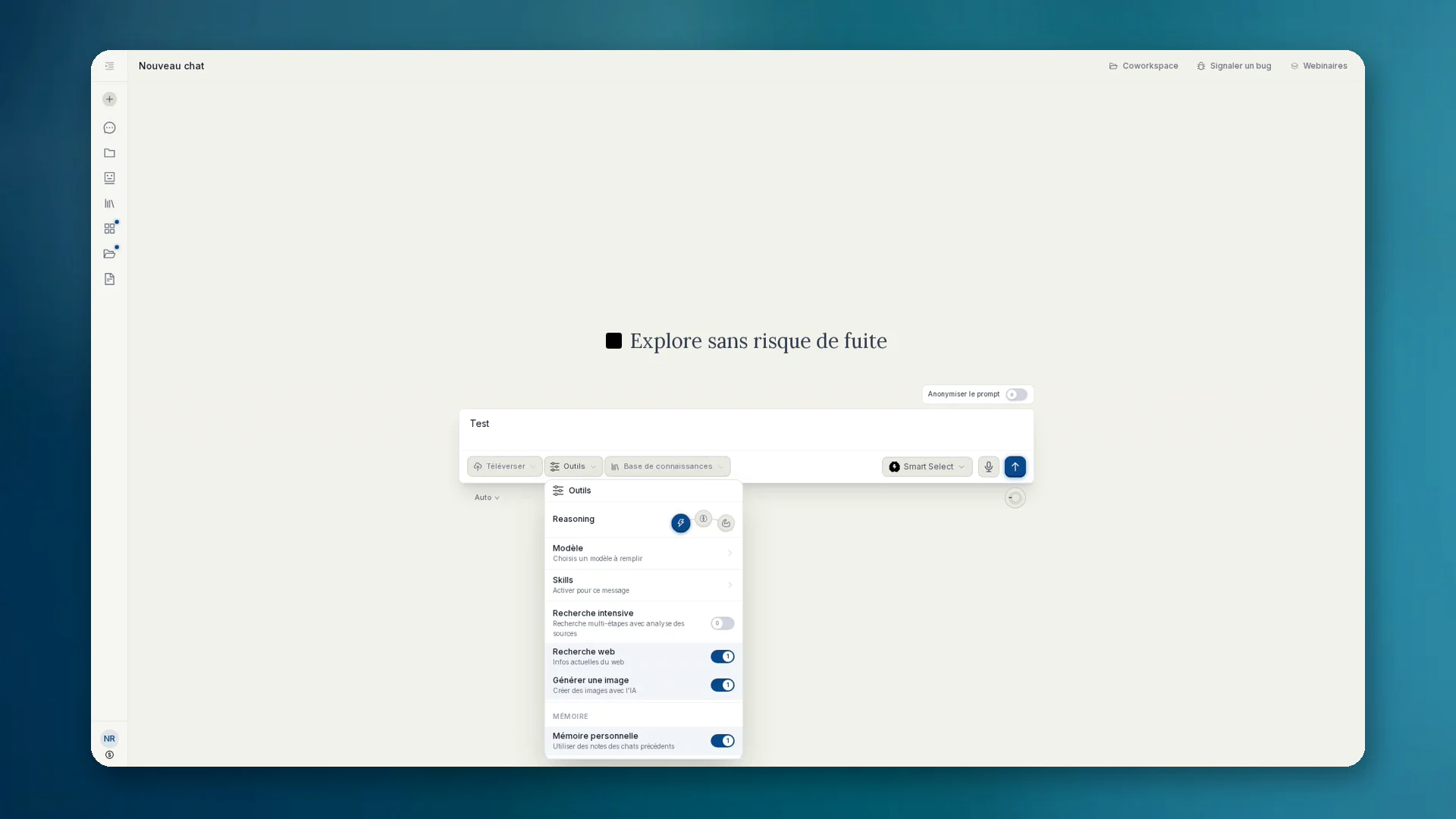
Qu'est-ce que la recherche intensive
Intensive Recherche est le nom produit allemand de la recherche en plusieurs étapes dans le chat. Dans l'interface française, l'option s'appelle Recherche intensive (Deep Research dans l'interface anglaise). En interne et dans les règles de gouvernance, le mécanisme s'appelle souvent deep_research.
Contrairement à une simple recherche web, anymize cherche de façon structurée, vérifie les sources, compare les affirmations et livre un résultat fiable. Idéal pour les due diligences, les notes de marché et les cas où une seule recherche ne suffit pas.
Comment l'utiliser
- 01Dans le chat, ouvre Outils et active Recherche intensive (à côté de Recherche web et Générer une image).
- 02Formule clairement la question de recherche : objectif, période, région, ce qu'il faut exclure.
- 03Lis le résultat et les sources. Pose des questions de suivi jusqu'à ce que la note tienne.
- 04Si tu veux, exporte-le comme artefact ou déplace-le dans une base de connaissances.
Gouvernance: désactiver dans l'équipe
Avec le plan Équipe, les admins peuvent activer Désactiver la recherche approfondie sous Conformité (règle disable_deep_research). La recherche web normale peut alors rester disponible, la variante intensive non. L'outil n'est plus proposé au modèle.
Si tu veux seulement des résultats de recherche, pas de longues recherches en plusieurs étapes : Recherche intensive désactivée, recherche web activée. Détails sous Governance : Conformité.
Quand plutôt qu'une simple recherche
- Due diligence et vérifications de contexte avec comparaison des sources
- Notes de marché et de concurrence
- Sujets où des sources contradictoires doivent être vérifiées