Automatic
Anonymization
in n8n
Self-hosted workflow automation for maximum data control and privacy.
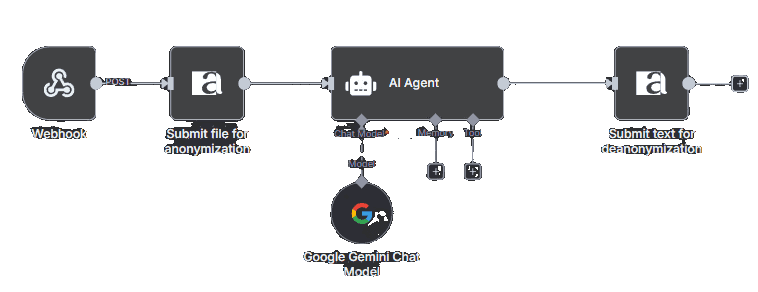
Common implementation patterns
Pattern 1: Secure AI Document Analysis
Document input → anymize anonymization → LLM processing → anymize de-anonymization → Final output
Pattern 2: Customer Support Automation
Support email → anymize → AI categorization → Automated response template → Human review
Pattern 3: Legal Document Processing
Contract upload → anymize → AI summary → Key points extraction → Client notification
Until now, AI was off-limits for lawyers, doctors and consultants. Too risky for sensitive data. Too dangerous for compliance. anymize changes that fundamentally. For the first time, professionals can use their real work data with the world's best AI systems.
n8n is the leading open-source workflow automation platform for developers and technical teams. With 400+ native integrations, full self-hosting and visual programming, you can build complex AI workflows without subscription limits. The anymize integration enables automatic anonymization in your self-hosted environments.
A lawyer deploys their contract analysis air-gapped on own servers with real client data. A doctor runs Claude integration in their private cloud with real patient data. A tax consultant develops custom AI workflows with real company data directly in their own IT infrastructure.
Every automation stays GDPR-compliant. Every customization is possible. Every line of code is yours.
Installationsoptionen
Option 1: Community Nodes (Recommended)
- 1. Go to Settings → Community Nodes in your n8n UI
- 2. Search for "n8n-nodes-anymize"
- 3. Click Install
Option 2: Manual Installation
npm install n8n-nodes-anymize
Option 3: Docker Installation
docker exec -it n8n npm install n8n-nodes-anymize
Setup:
- 1. Install the package using one of the methods above
- 2. Restart your n8n instance
- 3. Find "anymize" in the node palette
- 4. Configure it with your API key from anymize.ai
Technische Anforderungen
API Key Setup
1. Register at anymize.ai
2. Generate your API key in the dashboard
3. Use the key in the authentication settings of your workflow platform
Supported Input Formats
Text: Plain text, emails, messages
Documents: PDF, DOCX, Images (PNG, JPG)
Data: JSON, CSV
Output Options
Anonymized Text: Ready for LLM processing
System Prompt: Pre-configured instructions for AI models
Original Recovery: Bidirectional de-anonymization
Start now.
14 days free trial.
All models. All features. No credit card.
Rather watch first? Free webinar – anonymization live
We stand behind anymize. And we know – when an AI tool touches client, patient or employee data, a demo video isn't enough. That's why we give you 14 days of full access – all models, all features, no credit card. Enough time to be certain, before you trust us.
Your AI workplace awaits.